Kling 4.0 edit mode - four cinematic shots from one phone clip of yourself
Turn one short phone clip of yourself into four cinematic camera angles with AI
 Tested by Nouamane Benbrahim
Disclaimer: This is an independent creative test made with AI, for demonstration only. It isn't an ad for any brand shown or named, and isn't affiliated with, sponsored or endorsed by them. All trademarks belong to their owners
This is the video I posted on Instagram, here's the link if you want to watch it with sound.
In this post you'll learn how to:
- Get four new camera angles out of one short clip of yourself
- Keep your real pose, your real place and your real face in every angle
- Turn a plain daytime clip into a blue hour scene with the lights on
- Pull off a crane shot, a push-in, a rack focus and a low hero angle without a camera crew
I filmed myself sitting on some stone steps for 3 seconds and wanted to see how many movie-style shots I could get out of it. The steps have warm LED strips under every edge, so I made the light part of every shot. All four angles come from the same clip. I never went back to film again.
Here's my exact process.
1. Film a short, simple clip
I filmed in landscape, sitting still, hands clasped, looking off to the side. That's it. Keep it to 3 to 5 seconds with one simple action. The AI keeps your real motion, so the less you do, the easier it is for it to move the camera around you.
One tip: upload the original file from your camera roll. I ran mine through an editing app first and it came back with black bars baked in, which you don't want in the base clip.
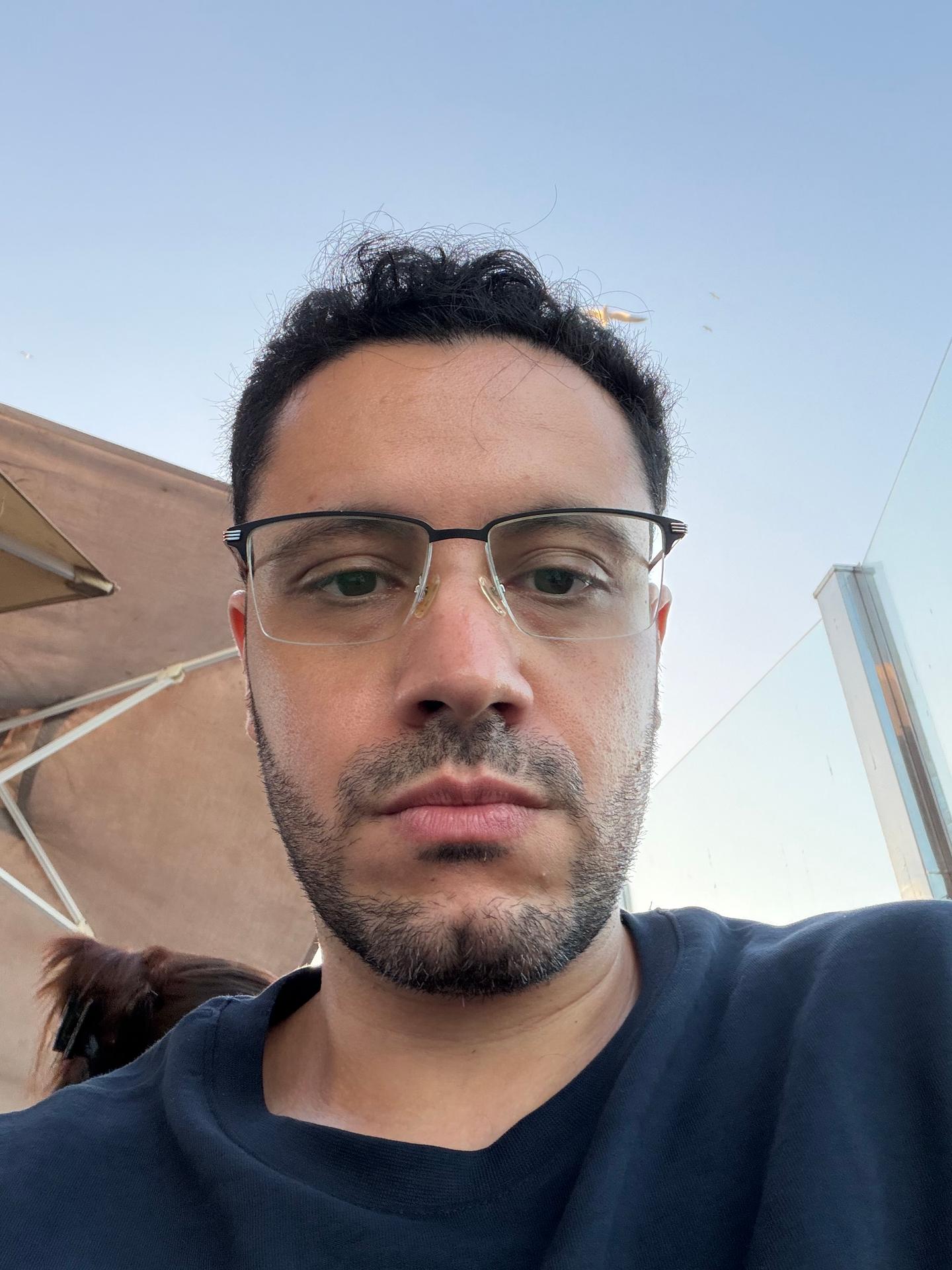
2. Add a close photo of your face
This is the step people skip. When the camera moves closer or swings to a new side, the AI has to draw parts of your face your clip never showed. Without a real photo it just guesses, and it loves to make you look older.
So I took one selfie in good light and gave it a single job in every prompt: "this is his face only, take nothing else from it." Wear the same top as your clip if you can, or name the clip's shirt in the prompt, because the AI will happily borrow the clothes from your selfie too.
3. The crane shot
For every angle I used the AI's edit mode, where you give it your clip and it rebuilds the shot while keeping your motion and timing. Then I described the new camera in plain words.
The first one starts high above the staircase at blue hour, with every lit step reading as a gold line across the stone, and comes down toward me sitting alone. I told it exactly where it starts, where it ends and that it's one continuous move.
Exact prompt
Create a new video where the man from @video_1, sitting on the edge of the stone steps with his hands clasped, gazing off to the left, is revealed by a crane shot descending from high above the staircase at dusk: the lit steps form rows of glowing gold lines, and the camera comes down to find him sitting alone. Keep his exact motion, timing and expression from @video_1. @image_1 is his face only: match his face, hair and glasses exactly, no aging. Take nothing else from it: not its pose, light, background, framing or camera. [SCENE 1] One continuous crane shot. It opens high above the wide stone staircase, looking down at a steep angle: the many steps stretch across the frame, each with a warm amber LED strip glowing under its edge, forming rows of parallel gold lines across the dark stone, with the palm tree and the buildings around the edges. He sits small near the bottom of the frame on a step edge, hands clasped, gazing left; a few people walk on the upper stairs as small silhouettes. The camera cranes down smoothly and steadily for the whole clip, descending and tilting up as it comes, until by the last frame it settles at his eye level in a medium-wide shot, him seated on the glowing step, the lit stairs rising behind him. Every small movement of his head and hands follows @video_1 exactly. No cuts, no shake. Light: blue hour, the sky a deep teal-blue. The warm amber LED strips under every step are the main light in the scene, about two stops brighter than the cool ambient, drawing hard bright lines across the stone and spilling warm light upward; he is lit warm from the step below him and cool from the sky. FIELD: the buildings dark with a few lit windows, the sky glowing blue. True colours: his black t-shirt, dark blue jeans, black hair, his natural skin tone, his glasses as in @image_1; the stone reads warm sand where the LEDs hit it and cool grey-blue elsewhere. Look: cinema camera, wide lens, deep focus on the high view, graphic composition of light lines, warm amber against teal grade, subtle film grain. Lonely, epic, one man in a big world. Constraints: one continuous shot, never cut. Keep his motion, timing and pose from @video_1 exactly; no new gestures. Keep his black t-shirt exactly as in @video_1. Preserve his face exactly as in @image_1, no aging, no added wrinkles, no change to his beard. No text, no logos.
4. The underlit push-in
Next I went low and close. The camera sits a bit below my eye line and pushes in from a medium shot to my face, with the LED strip under the step as the main light.
Be specific about the push. Say where it starts and where it ends, like "from a medium shot to a tight close-up on his face by the last frame." When I kept it vague, the camera barely moved.
Exact prompt
Create a new video where the man from @video_1, sitting on the edge of the stone steps with his hands clasped, gazing off to the left, is re-shot as a brooding underlit portrait at blue hour: a low three-quarter push-in to a close-up, his face lit only from below by the warm LED strips under the steps, against a cool blue sky. Keep his exact motion, timing and expression from @video_1. @image_1 is his face only: match his face, hair and glasses exactly, no aging. Take nothing else from it: not its pose, light, background, framing or camera. [SCENE 1] Open on a medium shot from a low three-quarter angle slightly in front of him and below his eye line: his head, shoulders, clasped hands and knees in frame, gaze fixed off to the left past the camera exactly as in @video_1. Every small movement of his head, eyes and hands follows @video_1 exactly. The camera makes one clear, steady push-in for the whole clip, from this medium shot to a tight close-up on his face and glasses by the last frame. No cuts, no shake. The stairs behind him are empty, no other people. Light: dusk has fallen to a deep blue hour. KEY: the warm amber LED strip glowing under the stone step he sits on, lighting him from directly below: warm uplight on his chin, the underside of his jaw, his nose and his clasped hands, with shadows falling upward above his brow. The upper half of his face and the side away from the light fall about three stops under, no fill, into deep shadow. A faint cool blue rim from the sky outlines his hair and shoulders. FIELD: the sky behind him a deep teal-blue, the steps and buildings dark silhouettes with a few warm LED lines glowing far behind, softly out of focus. True colours: his black t-shirt, dark blue jeans, black hair, his natural skin tone, his glasses as in @image_1; the lit underside of his face reads warm golden-amber, the shadow side deep warm brown, his hair edge cool blue. Look: cinema camera, 85mm lens, very shallow depth of field, his eyes sharp, the background melting into blue blur. Warm amber against teal grade, deep soft blacks, subtle film grain. Tense, quiet, heavy with thought. Constraints: one continuous shot. Keep his motion, timing and pose from @video_1 exactly; no new gestures. Keep his black t-shirt exactly as in @video_1. Preserve his face exactly as in @image_1, no aging, no added wrinkles, no change to his beard. No other people. No text, no logos.
5. The rack focus
This one opens on a glowing LED strip right in front of the lens with me as a soft blur in the background, then the focus pulls to me. The camera barely moves, the focus does all the work.
By the way, when the camera goes somewhere your clip never showed, the AI fills in the gaps. Mine added a few extra stairs that aren't really there. Check the background before you post.
Exact prompt
Create a new video where the man from @video_1, sitting on the edge of the stone steps with his hands clasped, gazing off to the left, is revealed through a rack focus: a warm LED step light glows huge and blurred in the foreground, then the focus pulls from the light to him. Keep his exact motion, timing and expression from @video_1. @image_1 is his face only: match his face, hair and glasses exactly, no aging. Take nothing else from it: not its pose, light, background, framing or camera. [SCENE 1] Open with the camera low and close to a stone step edge in the foreground, a warm amber LED strip glowing just beneath it, filling the bottom and one side of the frame. The focus is on the glowing light strip and the rough stone texture right in front of the lens; he sits in the middle distance on the step, hands clasped, gazing left exactly as in @video_1, completely out of focus, a soft dark shape. The camera stays almost still, with only a very slow drift forward. [SCENE 2] Then the focus pulls smoothly from the foreground light to him: the LED strip and stone melt into large soft warm bokeh while he snaps sharp, his face, glasses and clasped hands crisp by the last frame. Every small movement of his head and hands follows @video_1 exactly. The people on the stairs far behind him stay small, soft and out of focus. No cuts, no shake. Light: early blue hour, the sky a soft fading blue with the last warm glow at the horizon. The LED strips under the steps glow warm amber and are the brightest things in frame, spilling warm light up the stone and onto his legs and hands; his face is lit softly by the cool sky with a faint warm bounce from below. True colours: his black t-shirt, dark blue jeans, black hair, his natural skin tone, his glasses as in @image_1; the foreground bokeh reads rich amber-gold, the sky cool blue. Look: cinema camera, long lens, very shallow depth of field, creamy large bokeh, warm amber against blue grade, subtle film grain. Constraints: one continuous shot. Keep his motion, timing and pose from @video_1 exactly; no new gestures. Keep his black t-shirt exactly as in @video_1. Preserve his face exactly as in @image_1, no aging, no added wrinkles, no change to his beard. No text, no logos.
6. The low hero angle
Last one, the camera sits on the ground looking up at me from the same side I filmed, and pushes in slowly toward me against the blue sky.
In every prompt I named the real parts of the place: the stone ledge, the palm tree, the glass building, the white tower. That keeps it from inventing a new location around you.
Exact prompt
Create a new video, one single continuous shot with no cuts, where the man from @video_1, sitting on the long sandstone ledge with his hands clasped, gazing off to his left, is filmed from ground level looking up at him, from the same side as @video_1, with the camera slowly pushing in toward him, at deep blue hour with warm amber LED strips glowing under the stone ledges and steps. His pose, motion, timing and expression come from @video_1 exactly. @image_1 is his face only: match his face, hair and glasses exactly, no aging. Take nothing else from it: not its clothes, pose, light, background, framing or camera. [SCENE 1] Open on a wide, low shot from the same side of him as @video_1: the camera sits at ground level, just above the paving in front of the ledge, tilted up toward him, so the glowing front face of the stone ledge rises in the foreground and he sits above it against the deep blue sky, his whole body in frame, the palm tree trunk, the glass building, the flagpole and the white apartment tower behind him. From the first frame the camera pushes in slowly and steadily toward him, staying low and still looking up, one smooth continuous move, until by the last frame it frames his head and shoulders from below, his face sharp against the blue sky. Every small movement of his head and hands follows @video_1 exactly. No cuts, no shake, no sideways movement, no rotation. Light: deep blue hour. KEY: the warm amber LED strip glowing under the ledge he sits on, lighting the stone face of the ledge in the foreground and throwing warm light up onto his jeans, his clasped hands and the underside of his chin; his face otherwise lit softly by the cool sky, about two stops under the LED line. The LED strips under the steps behind him glow as thin warm gold lines. FIELD: the sky a deep teal-blue, the buildings dark with a few warm lit windows. True colours: his black t-shirt, dark blue jeans, black hair, his natural skin tone, his glasses with a thin black upper bar; the lit stone reads warm amber, the shadow side of his face cool blue-brown. Look: cinema camera, low wide-angle lens near the ground, shallow depth of field once close, warm amber against deep teal grade, subtle film grain. Heroic, quiet, cinematic. Constraints: one continuous shot, no cuts. The camera only moves forward and stays low looking up: no sideways slide, no orbit, no zoom into an extreme close-up, the move ends on head and shoulders. Keep his motion, timing and pose from @video_1 exactly; no new gestures, he keeps gazing to his left. Keep his black t-shirt exactly as in @video_1. Do not add stairs, steps, walls or buildings. Preserve his face exactly as in @image_1, no aging, no added wrinkles, no change to his beard. No text, no logos.
Why it works
Your clip already holds the hard part: you, your real movement and a real place. The AI only has to move the camera and change the light, and edit mode keeps your timing locked to the original take. The selfie fills in the face, and naming the real parts of the place keeps the background honest. The moves that held up best for me were the simple ones: push-ins, a slow crane and a focus pull.
Your turn: film yourself sitting still for 3 seconds somewhere with interesting light, then ask for one push-in.
And if you'd rather skip writing the prompts, Emero writes them for you and remembers your face and your shots for the next clip, all at cost.
Here's the full cut one more time:
Exact prompt
Combine the clips in order

Get one of these every day
I test new workflows daily and send them with the exact prompts, the models and the costs
6,526 generations tested so far
More workflows
See all
Kling 4.0 - AI video effects from your own clips: a stretchy arm, a kiss, a fly and a whip
Four AI video effects from my own phone clips: a stretchy arm, a kiss, a fly, a whip-arm
GPT Image 2.6 Flare, Kling 4.0, Nano Banana Pro · 7 min render

Kling 4.0 edit mode - relight one phone clip into night, golden hour and a time-lapse sky
Relight one phone clip of yourself into night, golden hour and a time-lapse sky with AI
Kling 4.0 · 7 min render

Kling 4.0 + GPT Image 2.6 Flare - how to make AI videos of yourself in six costumes
Six phone clips, six costumes, one script, with my real voice and motion kept
GPT Image 2.6 Flare, Kling 4.0 · 13 min render