Turn any reel into a camera motion previz for AI videos
Measure a reel's camera move and rebuild it as grey shapes, ready to send to a video model
 Tested by Nouamane Benbrahim
Disclaimer: This is an independent creative test made with AI, for demonstration only. It isn't an ad for any brand shown or named, and isn't affiliated with, sponsored or endorsed by them. All trademarks belong to their owners
I wanted to see how I could take a reel I like and turn it into a camera move previz, Blender style, for future AI generations.
The one I picked is a 9 second clip of a girl lying on a sofa, filmed from above (original by @isabelamachadou). It's 4 shots, and each one swoops up from the foot of the sofa into the overhead. The goal was a grey version with the exact same camera, so later I can hand that move to any video model as a reference. I did the whole thing in a Claude chat with a code sandbox, and it took about 10 minutes.
Here's my exact process.
1. Grab the reel
First I need the video, plus a direct link to it, because the models in the next steps fetch the video from a link. I just paste this into Claude:
"use yt-dlp to grab this reel: [your link]. i need the mp4 and the direct video link (yt-dlp -g). if instagram blocks you, tell me and i'll upload the file myself"
Quick warning: Instagram rate limits fast. yt-dlp gave me the direct link on the first try and got blocked on the second. If that happens, a scraper like Apify can pull the same link, or you can just upload the mp4. Your Claude also needs network access to Instagram for this. On Claude you turn that on in Settings › Capabilities.
2. Count the cuts and pick what matters
Then I have Claude find the cuts and show me a few frames. This reel turned out to be 4 separate shots, which is really easy to miss when you watch it at full speed.
Now I pick the stuff that shapes the space: the sofa, the person, her head, the pillow and the side tables. Lamps, plants and art don't help a camera reference, so I skip them.
3. Measure the camera
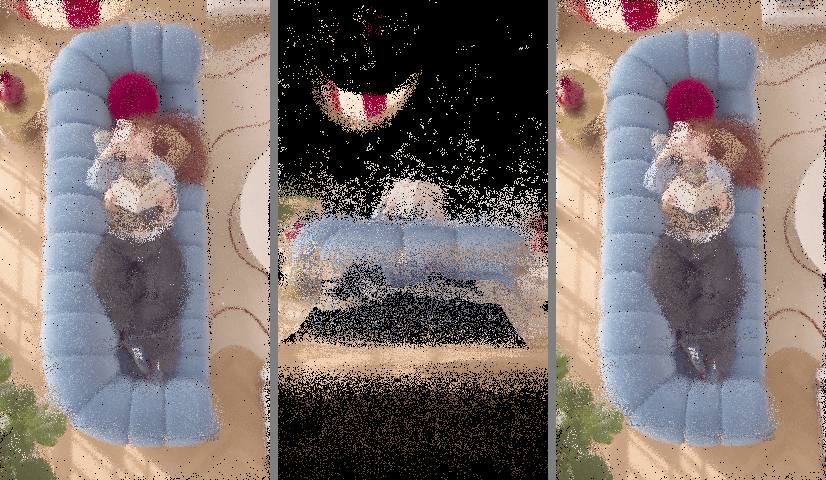
I don't try to describe the camera move from screenshots. Claude sends the video link to a model called VGGT on Replicate. It works out where the camera was in every single frame and rebuilds the room as millions of 3D dots. That took about 2 minutes.
Then Claude checks the measurement against the real video. It draws the dots from the measured camera and compares that picture to the actual frames. If they don't line up, I stop there, because every step after this one uses that camera.
4. Label everything by name
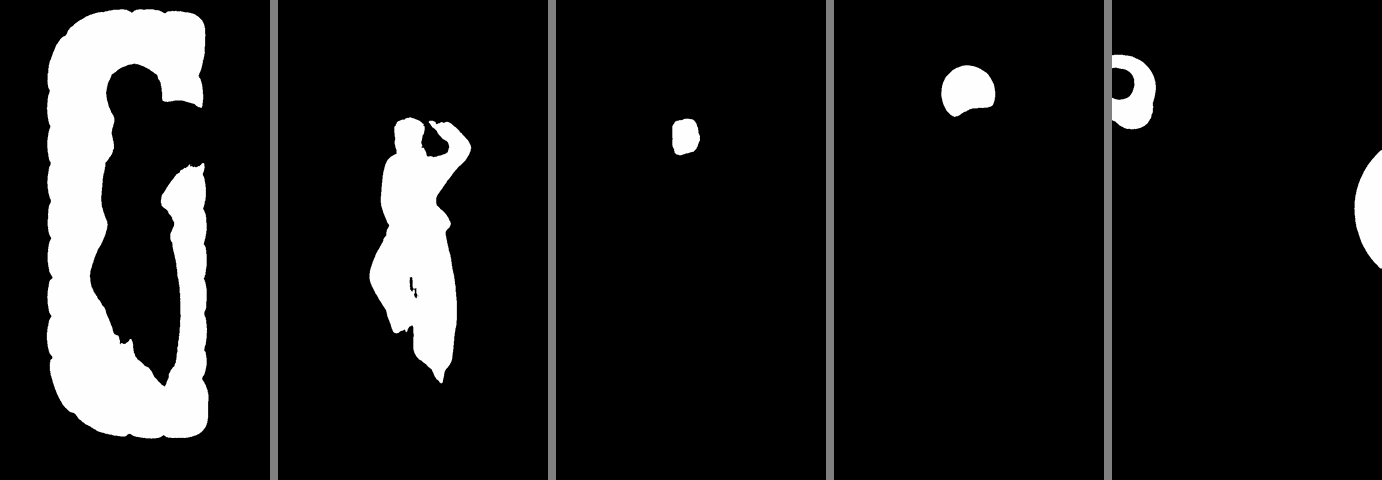
The dots don't know what they are. So Claude asks SAM 3 to outline the sofa, the person, the head, the pillow and the side tables across the whole video. Each outline took about 40 seconds, and they all run at the same time. Every dot then takes the name of the outline it lands in.
One tip: check the small parts. After the second cut, the "head" outline grabbed her whole body. Claude now ignores any frame where the head outline is almost as big as the person.
5. Swap the dots for simple shapes
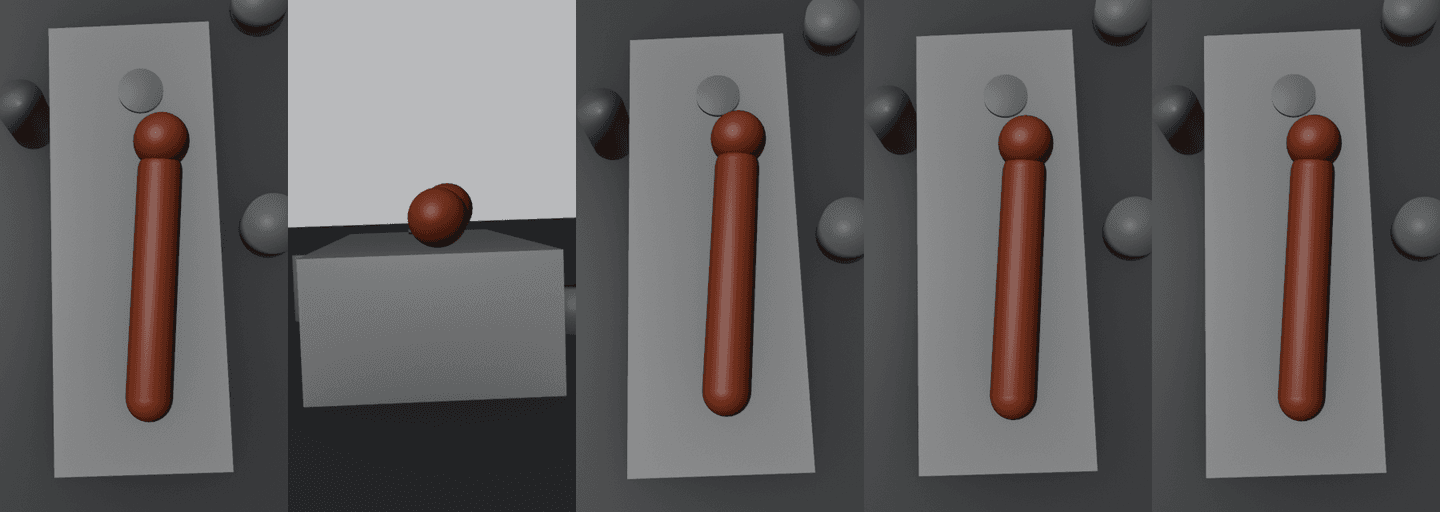
Now the dots become shapes: a dark floor, a box for the sofa, cylinders for the tables and the pillow, and a red capsule with a ball head for her. Everything sits on something, so the pillow rests on the sofa and the tables stand on the floor.
The head outline only decides which end of the capsule gets the ball. Her hair made that outline way too big to use for size.
6. Render the previz
Last, Claude renders it in Blender with its simple viewport look, flying the measured camera through the shapes. All 276 frames took about 100 seconds. I check a few stills against the real frames first, then render the full clip at the same length and frame rate as the reel.
That clip is ready to send to a video model as the camera reference. Next I'm gonna test which models follow it best.
Why it works
The previz only carries the camera. There's no face, no outfit and no colour in it, so a video model has nothing to copy from it except the move. And because the move was measured from the real video, the cuts and the swoops land at the same moments as the original.
Your turn: find a reel with a camera move you love and count its cuts. That's step one.
And when you're ready to generate, Emero's camera previz workflow takes a clip like this as the camera reference, at cost.

Get one of these every day
I test new workflows daily and send them with the exact prompts, the models and the costs
6,526 generations tested so far
More workflows
See all
Kling 4.0 edit mode - copy the color grade of any photo onto one phone clip
Copies the color grade of four photos onto one low-angle phone clip, sky and all
GPT Image 2.6 Flare, Kling 4.0 · 10 min render

Hook ideas for reels: sweat that turns to steam, a giant selling chains, a crumbling sandcastle and a fire saxophone
Four AI visual hooks from plain phone clips, posted as a before-and-after split
GPT Image 2.6 Flare, Kling 4.0 · 8 min render

Kling 4.0 + GPT Image 2.6 Flare - funny ads from four famous print ads, starring your own clips
Turn four famous print ad gags into funny video ads using your own 3 second phone clips
GPT Image 2.6 Flare, Kling 4.0 · 8 min render