Kling 4.0 + GPT Image 2.6 Flare - turn yourself into four characters from your own clips
I turn four clips of myself into four characters, keeping my real motion with edit mode
 Tested by Nouamane Benbrahim
Disclaimer: This is an independent creative test made with AI, for demonstration only. It isn't an ad for any brand shown or named, and isn't affiliated with, sponsored or endorsed by them. All trademarks belong to their owners
I take a plain three-second clip of myself and turn it into a visual hook, keeping my real movement the whole time. This round I did it four different ways, all from the same spot in my building.
Four clips, one simple move each, and AI adds one wild thing to each while my face and motion stay mine. None of these are clients, I just wanted to walk the whole method end to end: film yourself, build the look as a still, then animate it so your real movement carries.
Here's my exact process.
1. A comic-book gunman
I filmed a quick draw: standing in my lobby, I swing a rolled-up newspaper forward like I'm pointing something at the camera.
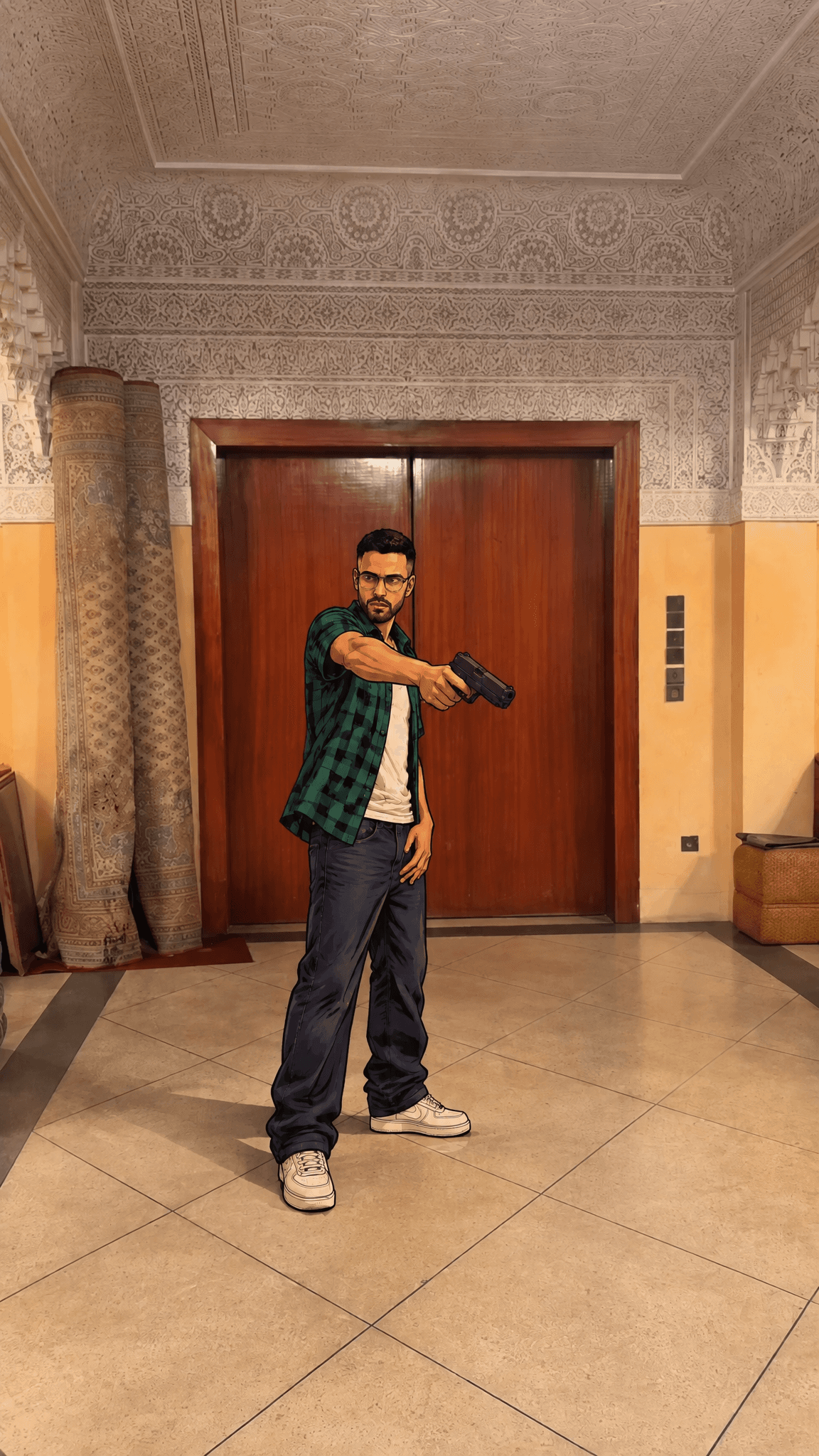
First I built the look as a still. I took one frame of me and turned it into a bold comic-book game-cover version of myself, and swapped the newspaper in my hand for a pistol.
Exact prompt
A composite: a REAL photographic background with ONLY the man redrawn as a bold illustrated game character. NO text, NO logo, NO UI, NO loading bar anywhere — leave clean empty space at the top for text to be added later. THE VIBE: The man looks like a Grand Theft Auto cover illustration — bold black outlines, cel-shaded flat fills — standing inside his real, photographic environment. A drawn character dropped into a real photo. THE BACKGROUND (keep photographic — do NOT illustrate): The real Moroccan riad lobby EXACTLY as in the FIRST reference — real carved plaster ceiling, real warm amber walls, real dark wood elevator doors, real carved stone pillar, real cream tile floor, real photographic lighting. Do not redraw, restyle, cel-shade, repaint or alter the background; it stays the untouched real photo from the first reference. THE SUBJECT (illustrate only this): The man, rendered in the bold GTA cel-shaded illustration style, with his look, green-and-black plaid Grove Street flannel over a white tank, baggy dark jeans and white sneakers, and matte-black pistol exactly as in the SECOND reference. Keep his real face, beard, glasses and true body build from the FIRST reference — do not bulk him up or slim him. Same pose and SAME SCALE as the first reference: standing at the same distance from camera, full-body, torso slightly turned, arm extended forward aiming the pistol toward the lower left. Place him exactly where he stands in the first reference, the same size in frame. THE KEY DETAILS: Absolutely no on-image text, numbers, title, watermark, sign or progress bar. The top ~18% of the frame (the plaster ceiling area above his head) stays clean, uncluttered negative space. THE LIGHT: The man is lit to sit believably in the real room — warm tungsten interior key from the upper front matching the photo, soft shadow grounding him on the real tile. THE COMPOSITION: Full-body man at the same scale and position as the first reference, center-left, standing on the real floor, head in the upper third with clear empty ceiling space above him. Vertical 9:16. THE AFTER EFFECT: Only the man carries the illustrated cel-shade finish; the background keeps its real photographic texture. References: FIRST reference = the real photographic background AND his true face/build/pose/scale — keep the background untouched and real. SECOND reference = how to draw the man (GTA illustration style, Grove Street outfit, pistol). Combine: real background from the first, illustrated man from the second at the first reference's scale. No text or UI at all.
Then the part that actually matters. I animated it in edit mode, which uses my original clip as the base. It keeps my exact draw and timing, and carries the gun through the whole move.
Exact prompt
Restyle the man in @video_1 into the bold Grand Theft Auto cel-shaded illustration character shown in @image_1, and REPLACE the rolled newspaper in his hand with a matte-black semi-automatic pistol. Keep his exact motion, timing and camera from @video_1. Critical object swap: the rolled newspaper/papers are GONE — there is NO paper anywhere in the clip. His hand grips a matte-black pistol instead. As he swings his arm up and then punches it straight forward (his original motion from @video_1), his hand is holding the pistol and ends aiming it forward. Render the man in the GTA illustration look from @image_1: bold black outlines, cel-shaded fills, open green-and-black plaid flannel over a white tank, baggy dark jeans, white sneakers, wire glasses, his real face, beard and build. Keep his pose, movement, timing and the riad lobby following @video_1. No text, no logo, no watermark.
One thing to know: edit mode likes to hold onto whatever is already in your hand. So you have to tell it straight up that the newspaper is gone and the hand is holding a gun now. Say it plainly and it does the swap.
2. A giant lightning sword
Same idea, bigger prop. I filmed myself raising my arm and swinging it out.
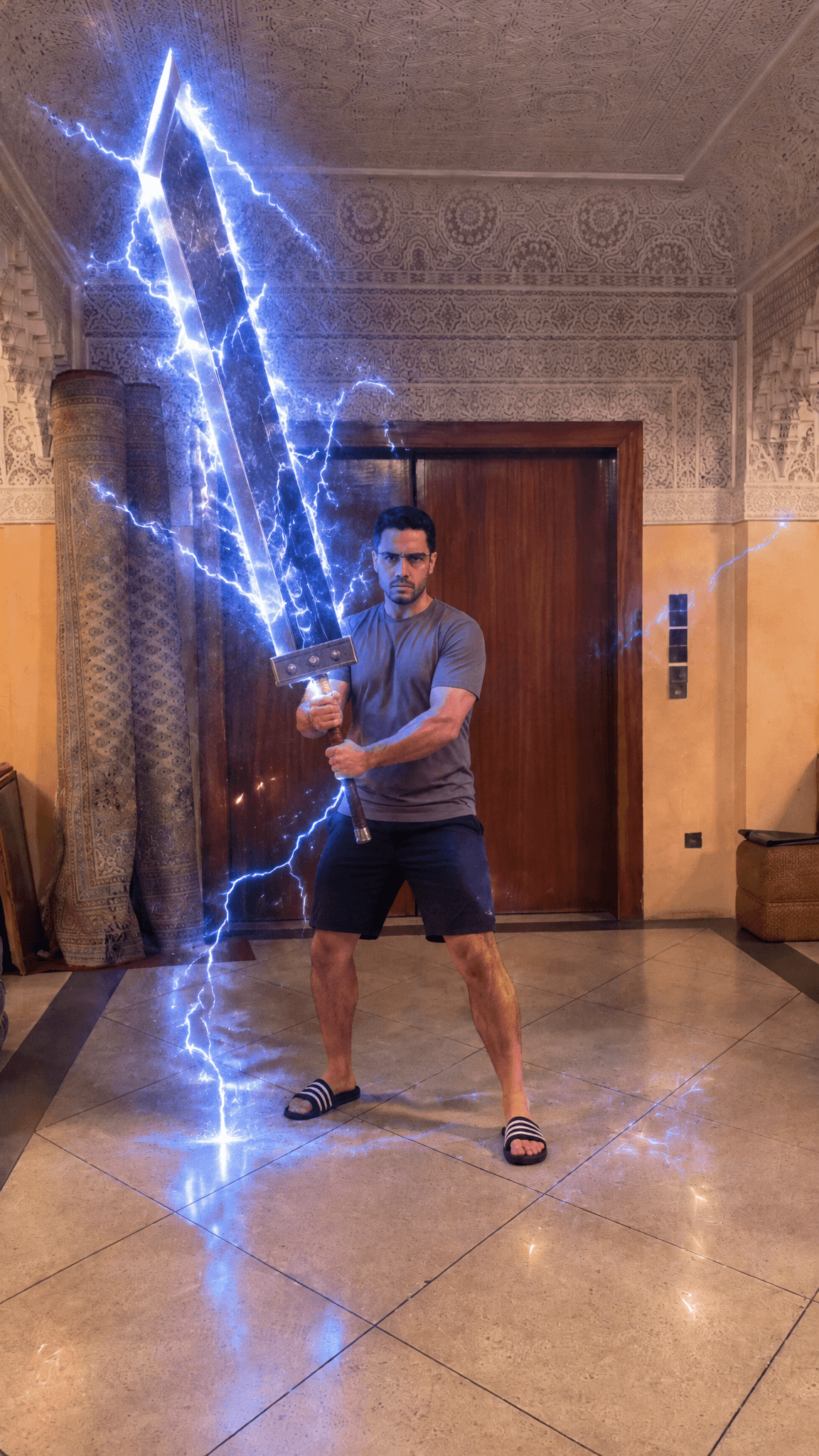
The still puts a massive greatsword in my hands, wrapped in crackling electricity, and keeps my real face and room.
Exact prompt
Create a new photorealistic image. Editorial photography, unretouched, no beauty filter, no skin smoothing. Preserve the man's exact face, beard, hair, skin tone and real body build, his real clothes (heather grey-mauve crew-neck t-shirt, black shorts, black slide sandals) and the real Moroccan riad lobby exactly as in the reference — then add a colossal greatsword in his hands and crackling electric energy around it. THE VIBE: A real photograph of the man standing in his actual riad lobby, now gripping an enormous video-game greatsword that crackles with electricity — a grounded, cinematic "real life meets game power" moment. Photoreal throughout, not illustrated. IDENTITY LOCK: The man from the reference — keep his exact face, beard, hair, skin tone and true everyday build. Do NOT bulk him up, slim him, age him, or add glasses. His real grey-mauve t-shirt, black shorts and slides, unchanged. THE SUBJECT: The realistic man, braced and gripping the huge greatsword two-handed, leaning slightly into its weight, an intense focused expression. Natural real-life proportions. THE FACE: Real skin with visible texture and pores, natural, no plastic smoothing; beard exactly as the reference shows. THE SETTING: His real riad lobby — carved plaster ceiling, warm amber walls, dark wood elevator doors, carved stone pillar, cream tile floor — kept photographic and unchanged from the reference. THE KEY DETAILS — THE SWORD (HUGE): An oversized Final-Fantasy-style greatsword — a broad, flat, single-edged steel slab nearly as tall as the man, with a clean beveled chisel tip, a long cloth-wrapped grip and a couple of round metal accents near the guard. Rendered realistically: brushed and polished steel with true reflections of the warm room and the blue electric glow. THE LIGHT: KEY — the warm tungsten room light on one side, and the sword's electricity as a cool blue-white practical source rimming him, flickering cold light across his lit side, arms and face. FIELD — the warm amber room at mid brightness. Where the electric arcs are near, skin and steel take a cool blue-white cast; the far side stays warm. THE AFTER EFFECT — THE ELECTRICITY: Vivid blue-white electric arcs crackling and branching all along and around the blade, forking tendrils licking off the steel edges, a charged glowing aura, scattered sparks and a faint haze of light, with a few arcs grounding down to the tile and flickering across the nearby wall. Bright, dynamic, frozen mid-crackle — energetic but not blowing out the frame. Final-Fantasy limit-break energy. THE CAMERA: Authentic photographic capture, deep focus, everything sharp; fine natural film grain across the whole frame including the face and skin. Looks like a real person photographed on location, not a render. THE COMPOSITION: Full-body man at the same scale and position as the reference, center frame, the enormous blade rising upward with the electric glow filling the upper space. Vertical 9:16. References: The reference is the real man, his real clothes and the real room — preserve all three exactly; only add the greatsword and the crackling electricity.
Edit mode again, my clip as the base, so my real swing carries and the newspaper turns into the sword.
Exact prompt
In @video_1, keep the man's exact motion, timing and camera, and REPLACE the rolled paper in his hands with the enormous Final-Fantasy-style greatsword wreathed in crackling blue-white electricity shown in @image_1. Critical object swap: the rolled paper is GONE — there is NO paper anywhere in the clip. His hands now grip the massive steel greatsword instead. As he moves exactly as in @video_1 — raising his arm, bringing it to both hands, then swinging it out — the giant sword follows his hands through that same motion. Vivid blue-white electricity crackles, snaps and branches along the whole blade the entire time, trailing forked arcs and flickering across the floor and walls. Keep him photoreal and exactly himself from @video_1 — his real face, beard, grey-mauve t-shirt, black shorts, black slides and true build — and keep the real riad lobby exactly as in @video_1. Only the paper becomes the lightning greatsword. No text, no logo, no watermark.
Tip from this one: a big, dominant object swaps in way easier than a small one. The sword basically took over the frame on the first go, no fighting.
3. A desert survival suit, and sand in my lobby
I filmed myself just standing there, hand on my chin, barely moving.
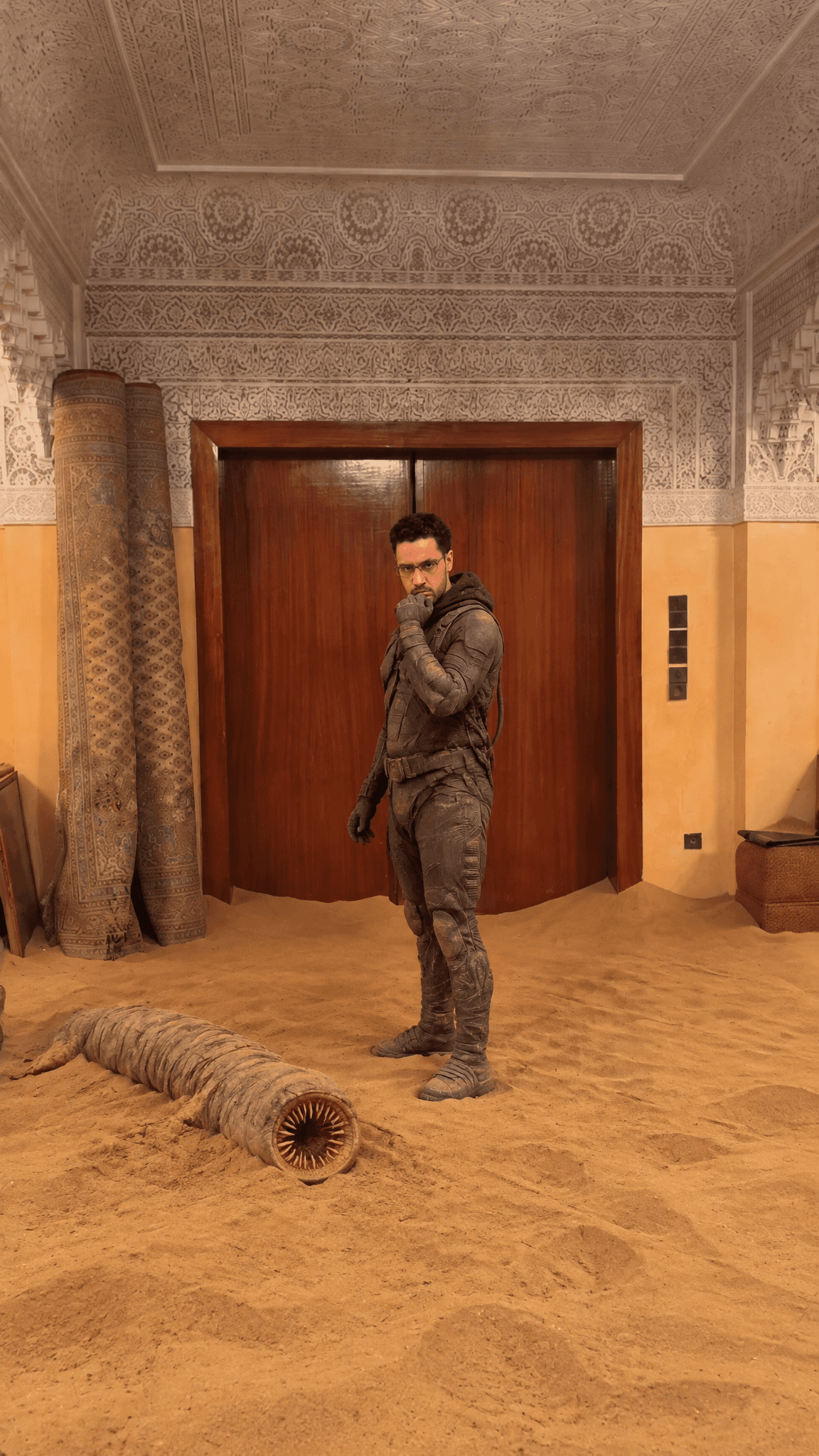
For the still I put myself in a ribbed desert survival suit, dumped a truckload of sand across my actual floor, and dropped a dead creature in it. The key part: I kept my real room, the walls, the elevator, all of it. Only the floor and my outfit changed.
Exact prompt
Create a new photorealistic image. Keep the reference photo exactly as it is — same camera angle, framing, crop, the real Moroccan riad lobby (carved plaster ceiling, warm amber walls, dark wood elevator doors, carved stone pillars, rolled rugs), the warm indoor lighting, and his standing pose and expression. Editorial, unretouched, no beauty filter, no skin smoothing. Preserve his face exactly, no aging. Change only three things: bury the floor in dumped desert sand, dress him in a desert stillsuit, and add a dead baby sandworm on the sand. THE VIBE: A surreal, grounded moment — his real ornate riad lobby, but a truckload of golden desert sand has been dumped across the floor, a dead young sandworm lying in it, him standing there in a Fremen-style stillsuit. Photoreal, cinematic, a little uncanny. IDENTITY LOCK: Preserve his face exactly as in the reference, no aging. Keep his real build, his contemplative standing pose (hand near his face) and the same camera framing. THE SUBJECT: The man, now wearing a Fremen-style desert stillsuit — a form-fitting ribbed grey-black survival bodysuit with tubing, segmented panels, straps, a hood/collar, gloves and desert boots, dusted with sand. Same pose. THE SETTING (room UNCHANGED, sand added): The SAME real riad lobby from the reference, kept exactly — same ceiling, amber walls, wood elevator doors, carved pillars and rugs, untouched above the sand line. But the tiled floor is now buried under a thick, uneven spread of golden desert sand piled into low drifts and dunes, as if a dump truck emptied a load of sand into the lobby — sand heaped across the floor, drifting up against the pillars and the elevator doors, loose grains scattered. Indoors, not a desert. THE KEY DETAILS — DEAD BABY SANDWORM: A dead young sandworm lying in the sand near him — segmented, ribbed, cylindrical, a couple of metres long, pale sand-grey, its round ringed mouth agape, lifeless and motionless, half-sunk into the dumped sand. THE LIGHT: Keep the real lobby's warm tungsten interior light from the reference, unified across the man, the sand and the room; soft indoor shadows. NOT desert sun — it is indoors. THE CAMERA: Authentic photographic capture, deep focus, everything sharp; fine natural film grain across the whole frame including the face and skin. Looks like a real photo, not a render. THE COMPOSITION: Full-body man at the same scale and position as the reference, the dead sandworm lying in the sand to one side, the real lobby framing him. Vertical 9:16. References: The reference is the man AND his real riad lobby — preserve his face, build, pose, the room, ceiling, walls, elevator, pillars and the warm indoor light; change only: bury the floor in dumped desert sand, dress him in the stillsuit, and add the dead baby sandworm in the sand.
In edit mode my posing stays the same, the sand blows and drifts around the room, and I pushed the whole thing to a darker, moodier grade.
Exact prompt
Restyle the man in @video_1 to match the look of @image_1: the man in a Fremen-style desert stillsuit standing in his real riad lobby whose floor is buried under dumped desert sand, with a dead baby sandworm lying in the sand. Keep his exact motion, timing and camera from @video_1 — he stands and shifts his contemplative pose (hand near his face). Over the clip, the sand MOVES through the scene: wind kicks up and loose grains and thin sheets of dry sand drift, stream and swirl across the sandy floor and lift into the air around him, blowing past the carved pillars and over the dead sandworm, stirring and resettling as he holds and shifts his pose. It moves like fine windblown desert sand — dry and airborne, never like water. The dead sandworm stays still and lifeless. Dark, cinematic Dune-style colour grade: desaturated and moody, cooler and dimmer than a bright snapshot, crushed shadows, muted earth tones. Keep him exactly himself from @video_1 — his real face, beard and build — wearing the stillsuit from @image_1, and keep his real riad lobby with the dumped sand. No text, no logo, no watermark.
Keeping your real background is what makes this land. It feels like someone actually dumped a desert into your hallway.
4. A giant monster stomping a city
Last one. I filmed a crouched, clawing stomp, like I'm wrecking something.
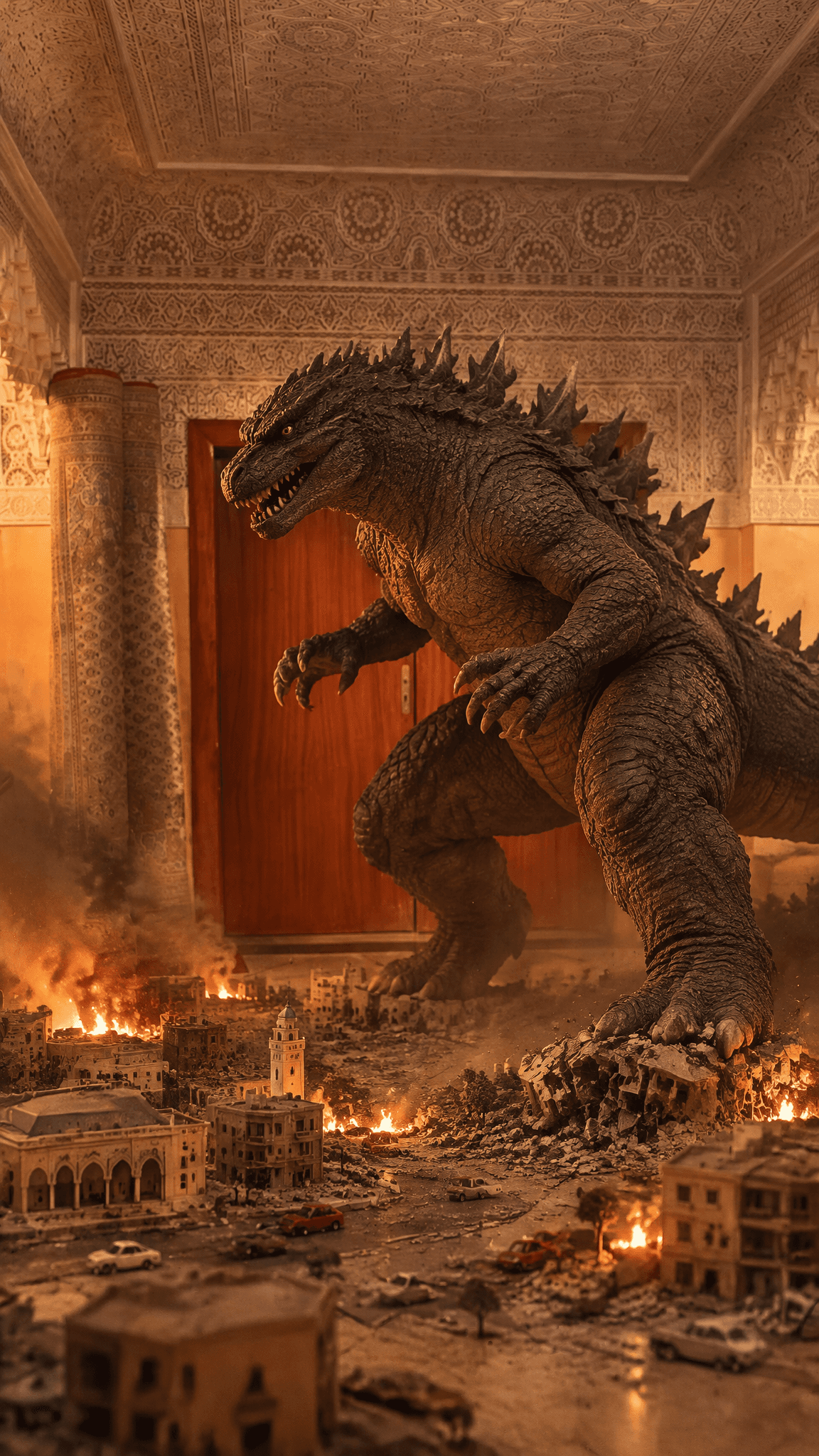
The still turns me into a full scaly monster towering over a tiny city, mid-destruction, still inside my lobby.
Exact prompt
Create a new photorealistic, cinematic image. Transform the figure in the reference into a full reptilian kaiju and add a tiny toy-scale city at its feet, all inside the man's real lobby. THE VIBE: A classic giant-monster movie hero shot — a towering reptilian kaiju standing in an ornate riad lobby, a miniature toy-scale city sprawled at its feet. Photoreal, cinematic, dramatic. THE SUBJECT / THE CHARACTERS: A giant reptilian kaiju in the same crouched, forward-leaning, clawing stance as the reference — thick charcoal-grey scaled hide, a full dinosaurian reptilian head (heavy ridged brow, broad angular snout, deep-set reptilian eyes, entirely non-human), rows of jagged bony fins running down the head, neck, spine and a heavy tail, powerful clawed arms and legs. A full monster with no human features. THE SETTING: The same real riad lobby from the reference — carved plaster ceiling, warm amber walls, dark wood elevator doors, carved stone pillars — kept as the backdrop it looms inside. THE KEY DETAILS: A miniature toy-scale city across the lobby floor at its feet — tiny buildings and streets, some toppled and flattened under its feet, scattered rubble, small plumes of smoke and little glowing fires among the toy buildings. THE LIGHT: KEY — the warm lobby light plus a warm orange glow rising from the little fires below, raking across the scaled hide. FIELD — the amber lobby at mid brightness. Moody, high-contrast cinematic grade. THE MOOD: Epic, cinematic kaiju-movie energy. THE COMPOSITION: The kaiju looming in the center and upper frame in its crouched pose, the tiny city across the lower frame, the real lobby around it. Vertical 9:16, low angle. THE CAMERA: Photoreal cinematic, a low angle emphasizing its scale, deep focus, fine film grain. References: The reference is the man and his real lobby — use his crouched pose and the real lobby, transform the figure into a full reptilian kaiju with no human features, and add the miniature toy-scale city at its feet.
Edit mode takes my stomp and drives the monster with it.
Exact prompt
Restyle the figure in @video_1 into the full reptilian kaiju shown in @image_1 — a giant monster with thick scaled hide, jagged dorsal plates, clawed limbs and a heavy tail — looming in the real riad lobby over a miniature toy-scale city. Keep his exact motion, timing and camera from @video_1: his crouched, forward-leaning stomping and clawing movement becomes the kaiju stomping and swiping its claws over the tiny city at its feet. Over the clip, the miniature city smoulders and crumbles: smoke billows upward, little fires flicker and glow among the toy buildings, dust and debris stir and scatter as the kaiju shifts its weight and stomps. The monster moves with heavy, powerful weight. Dark, cinematic kaiju-movie colour grade: moody and smoky, warm orange firelight rising from below against the ornate lobby. Keep the real riad lobby backdrop exactly — carved ceiling, amber walls, dark wood elevator doors, carved pillars. No text, no logo, no watermark.
This one had a real snag worth sharing. The model wouldn't morph my actual face into a monster, it kept getting blocked. So I dropped my face completely and made it a full monster head instead. Built that way from scratch, it went through with no problem.
5. String them together
Line each original up next to its AI version and join the four into one reel. You can do that in emero, or by hand in whatever you edit in, like Instagram Edits or CapCut.
Why it works
The whole thing runs on edit mode. It takes your real clip as the base, so your movement and timing stay yours, and it swaps what's in your hands or around you. If you skip that and just animate the still on its own, the model invents the motion from scratch and it won't match what you actually did. I learned that the slow way on the sword before I switched back to edit mode.
The other half is your real room. Leaving your actual background in place is what makes people believe it's really you in there with a sword or a monster at your feet.
Your turn: film three seconds of yourself doing one clear move, then pick one thing to turn into. Build the still first, then animate it in edit mode.
If you'd rather not mess with modes and prompts, Emero picks the mode for you and writes the prompts, and it remembers your look so you're not starting from zero every time. All at cost.

Get one of these every day
I test new workflows daily and send them with the exact prompts, the models and the costs
6,546 generations tested so far
More workflows
See all
Kling 4.0 edit mode: the lights on, lights off ghost challenge from your own footage
How to put an AI ghost into your own phone footage for the lights on, lights off challenge
GPT Image 2.6 Flare, Kling 4.0 · 8 min render
Kling 4.0: video-to-video AI that keeps your real motion
A video to video AI workflow that keeps your real footage and turns sayings into clips
GPT Image 2.6 Flare, Kling 4.0 · 8 min render

Kling 4.0 - AI body transformation hooks: whip arm, sand tornado, stretchy neck and a shark sea
Four visual hooks from 3 second phone clips, with parts of my body turned into something
GPT Image 2.6 Flare, Kling 4.0 · 12 min render