Kling 4.0 edit mode: video to video AI that swaps your head mid-sentence
Feed in a clip you filmed and get it back with your head swapped, voice and lip sync kept
 Tested by Nouamane Benbrahim
Disclaimer: This is an independent creative test made with AI, for demonstration only. It isn't an ad for any brand shown or named, and isn't affiliated with, sponsored or endorsed by them. All trademarks belong to their owners
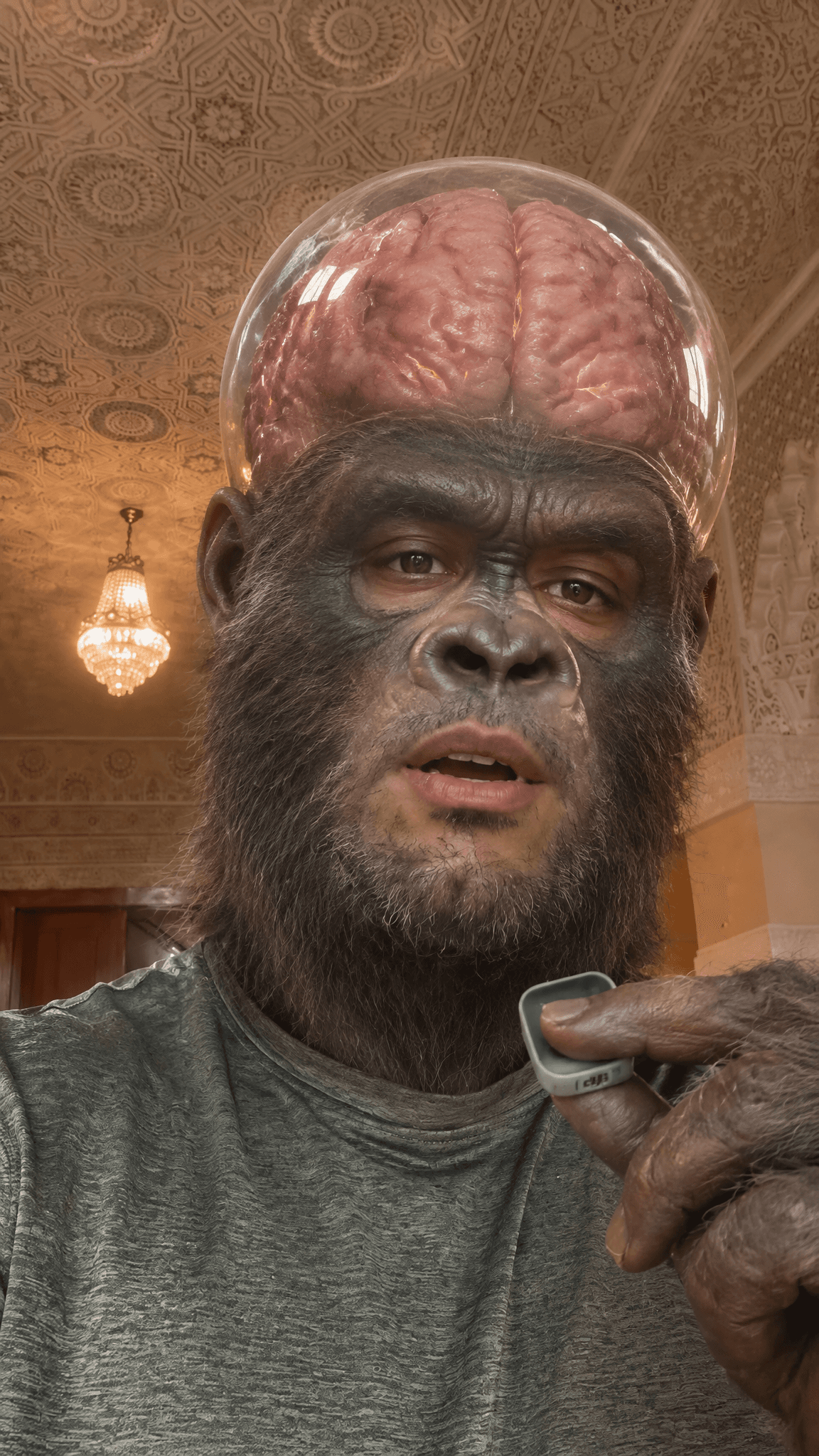
I took a plain talking-head clip of myself and turned my head into a different thing every few seconds while I kept talking. A "wrong turn" road sign, a giant ape with its brain in a glass dome, and two tech logos bouncing on springs off my head.
It's all video to video. You feed in a clip you already filmed and get the same clip back with your head swapped, your real voice and mouth still moving. The part that took me the longest wasn't the heads, it was getting a real brand logo to show up as an actual 3D object instead of a flat sticker. I'll show you that one too. None of this needed fancy filming, I shot it on my phone in a hallway.
Here's my exact process.
1. Start with a clip you already have
First I grab a clip of me talking to camera.
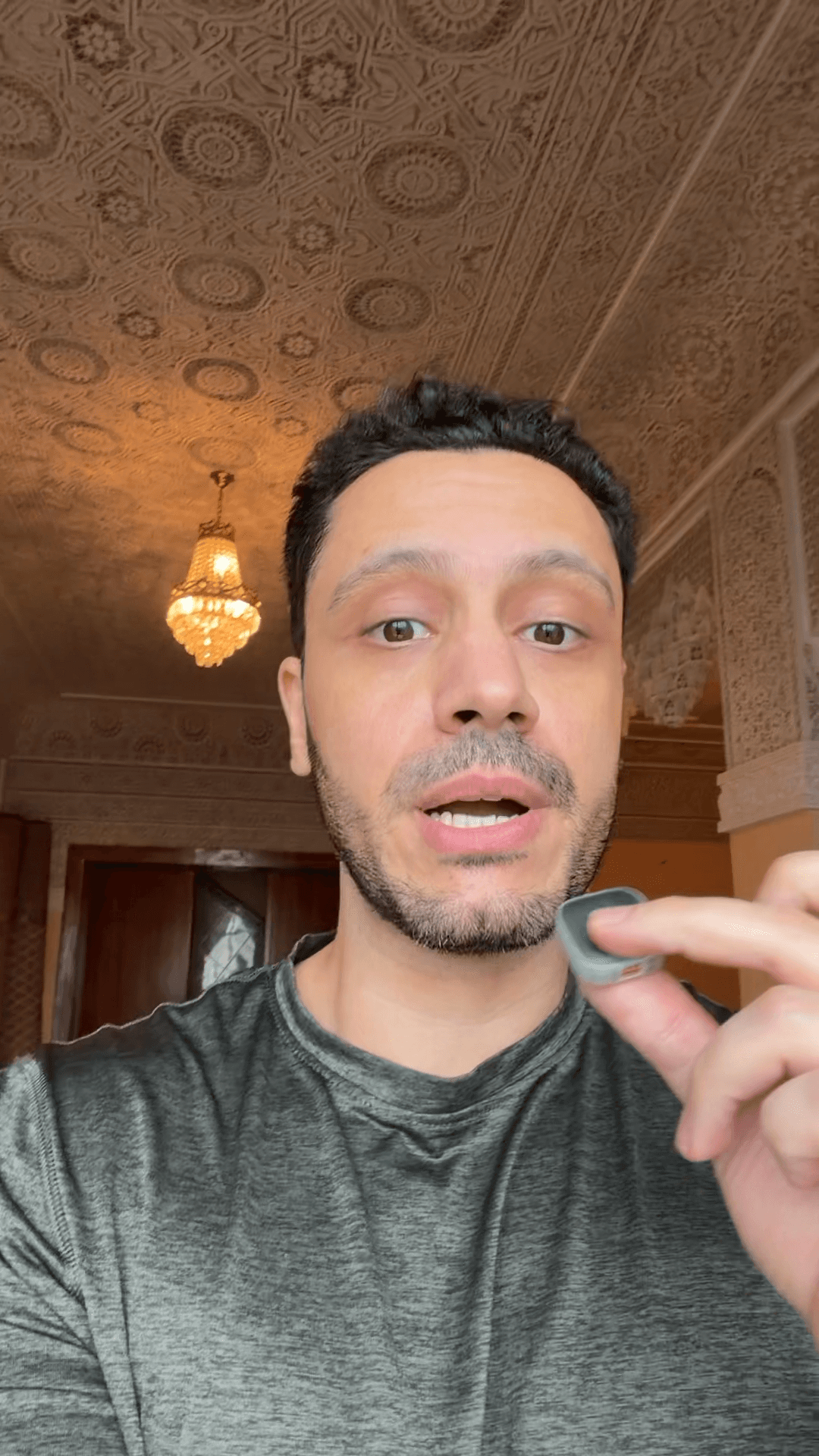
That's it. One take, phone held out, decent light on my face. The whole thing runs off your real footage, so your head movement, your hands, your voice and your lip movement all carry through. Before anything else I watch it back and note where each line lands, because each hook is going to sit on one line.
2. Pull the frame you'll build on
Then I pull one clean frame out of the clip where my face is clear. This frame is what I build the look on. Everything the edit needs to know about the new look, it reads off this one still.
3. Build the look as one thing, with your face in it
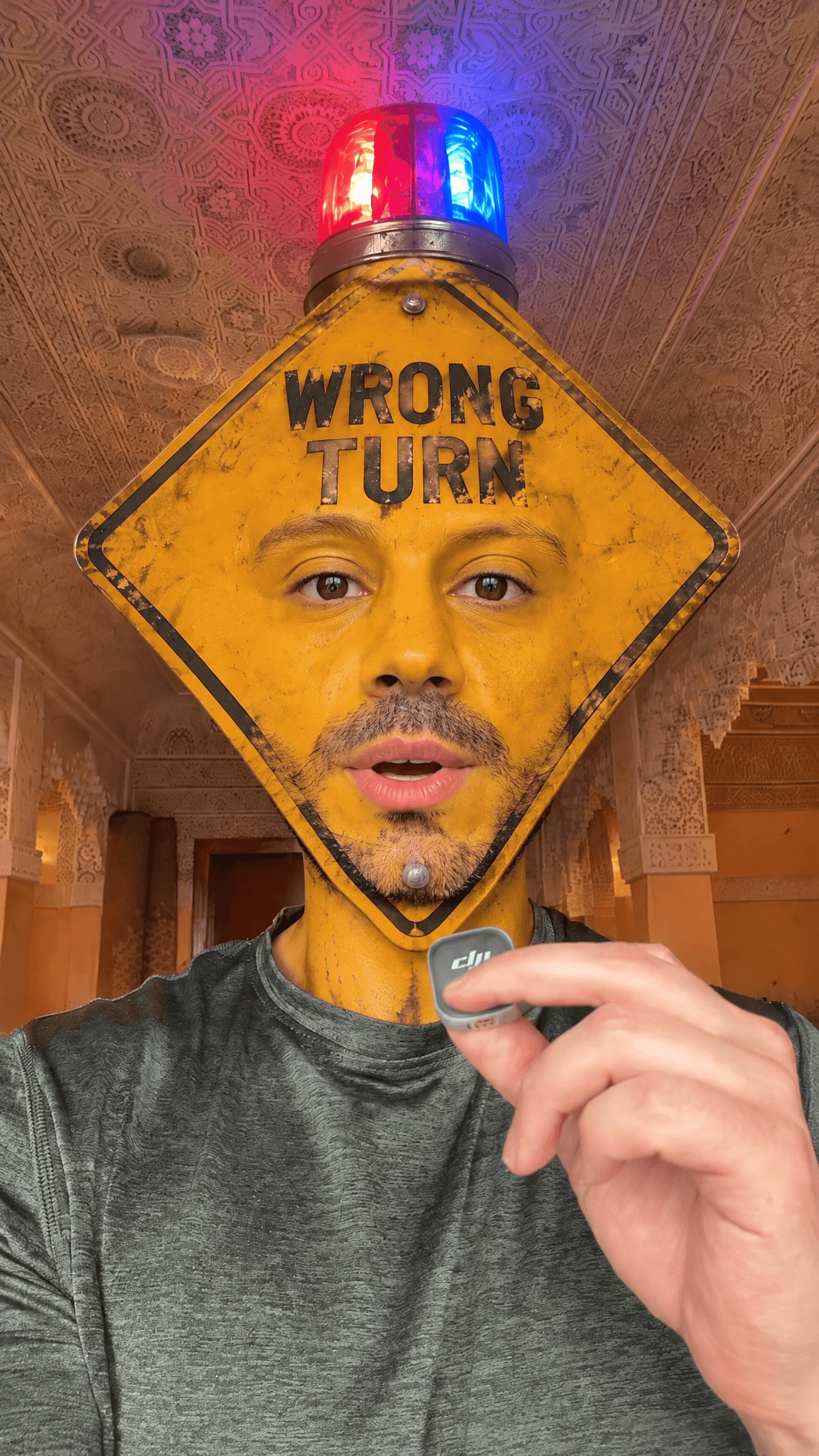
Now I make the still: my head becomes the object. First one was the road sign.
Exact prompt
Create a new photorealistic image, shot natively in camera in a single real take — not a composite, cutout or paste-up. A vertical selfie-video still in which the man's head and a "WRONG TURN" road sign are fused into one single object: his head IS the sign, yet his own real eyes and mouth are set into it, so it is unmistakably him and can look and talk. THE VIBE: Deadpan absurdist meme energy, scroll-stopping. Photoreal throughout; the one impossible thing is that his head has become a living traffic sign with his face in it. Dry, confident, funny. IDENTITY LOCK: His real eyes, eyebrows, nose, mouth and dark short stubble, and his open-mouth talking expression, from the first reference — unmistakably him, no aging. THE SUBJECT: A man chest-up in a handheld vertical selfie, same relaxed slightly-leaning pose as the first reference. One hand is raised holding a small grey clip-on DJI microphone near chin height, same grip, from the first reference. Heathered green marl athletic t-shirt, from the first reference. THE FACE AND HEAD (fused with the sign): His entire head is a bright chrome-yellow diamond-shaped WRONG TURN road sign — the same weathered yellow metal, black diamond border, mounting bolts and faint scuffs, and the round red-and-blue emergency siren beacon bolted on the top point, all from the second reference. Set naturally into that yellow sign surface are his own real human eyes and eyebrows in the upper third and his real mouth with stubble around it in the lower third, from the first reference — living and expressive, the same gaze and open-mouth talking expression as the first reference. His skin becomes the yellow sign material seamlessly around his eyes and mouth: one continuous fused surface, NOT a mask over a face and NOT a sign held over a head. The black "WRONG TURN" capital letters sit across the upper band of the sign, above his eyes, still legible. THE SETTING: The Moroccan riad hallway — carved pale plaster walls, a painted carved cedar ceiling, a crystal chandelier down the hall, warm wooden doors, soft warm daylight, from the first reference. THE LIGHT: KEY — soft warm ambient daylight and tungsten from the front and slightly above, wrapping the yellow sign-face and the green tee evenly in low-contrast light, matching the first reference. FIELD — the hallway sits about a stop brighter toward the far windows, warm amber. PRACTICAL — the siren dome throws alternating red and blue glow onto the carved ceiling above and a subtle red/blue rim on the sign's top edge, with a faint colored catch-light in his real eyes. Colour grade warm, natural, standard dynamic range. THE KEY DETAILS: his real living eyes and mouth inside the yellow sign; the black "WRONG TURN" text; the red/blue siren beacon; the grey DJI mic in his hand; the carved riad behind. THE MOOD: absurd, deadpan, alive — a talking warning sign that is clearly him. THE COMPOSITION: Vertical 9:16, chest-up. The fused sign-head sits where his head is in the first reference, its centre roughly a quarter to a third down from the top, the siren reaching toward the top edge with a little ceiling headroom. Shoulders and green tee fill the lower third, the hand with the mic lower in frame. Same framing as the first reference. THE CAMERA: iPhone front-facing selfie, handheld, natural, slight low angle looking up so the ceiling shows — exactly the capture of the first reference. Not cinematic, no DSLR look.
Two things I learned the hard way here.
First, don't paste the object on top of your face. My first few came out looking like a sign floating in front of my head, basically bad photoshop. The fix was to build it as one solid object, shot like it's really there, my head and the sign fused into a single thing.
Second, keep your real eyes and mouth in it. I made a version where my whole head was just the sign with no face. Looked cool, but then it can't talk. So now I set my real eyes and mouth into the object so it still lip-syncs, which is what makes it read as me instead of a graphic.
Exact prompt
Create a new photorealistic image with cinematic creature-VFX quality — like a real movie prosthetic plus CG, physically present in the room, NOT an AR face filter or flat overlay. Shot natively in camera in a single take. A vertical selfie-video still in which the man's head has become a hulking super-intelligent gorilla head with a giant exposed brain under a clear domed cranium, yet it carries his own real eyes and mouth, so it is unmistakably him and can look and talk. THE VIBE: Sinister comic-book evil-genius energy — a hyper-intelligent mind-control ape. Textured, photoreal, cinematic, menacing. It must feel like a real creature in the room, movie-quality, never a cheap filter. IDENTITY LOCK: His own real human eyes, his real mouth and the dark short stubble around it, and his open-mouth talking expression, from the first reference — intelligent and intense, unmistakably him, no aging. THE SUBJECT: A man chest-up in a handheld vertical selfie, same relaxed slightly-leaning pose as the first reference. One hand is raised holding a small grey clip-on DJI microphone near chin height, same grip, from the first reference. Heathered green marl athletic t-shirt, from the first reference. THE FACE AND HEAD (genius ape, exposed brain): His entire head is now a massive, powerful gorilla head — coarse dark brown-black fur, a deep heavy protruding brow, broad flat leathery nose and dark skin. Crowning it, the cranium is hugely enlarged and capped by a thick clear glass dome that reveals an oversized wet pulsing pinkish-grey brain inside, with deep folds, fine veins and a faint cold inner glow. Set naturally into the gorilla face are his own real human eyes beneath the heavy brow and his real human mouth with stubble below — living, expressive, same gaze and open-mouth talking expression as the first reference. The fur meets his real skin seamlessly around the eyes and mouth: one continuous, physically real creature head, NOT a mask and NOT a filter laid over his face. THE SETTING: The Moroccan riad hallway — carved pale plaster walls, a painted carved cedar ceiling, a crystal chandelier down the hall, warm wooden doors, soft warm daylight, from the first reference. THE LIGHT: KEY — soft warm ambient daylight and tungsten from the front and slightly above, wrapping the fur and the glass dome evenly in low-contrast light, matching the first reference; the glass dome and the wet brain catch soft specular highlights with subtle subsurface glow, and a faint cool rim separates the dome from the ceiling. FIELD — the hallway sits about a stop brighter toward the far windows, warm amber. Colour grade warm, natural, lightly cinematic, standard dynamic range. THE KEY DETAILS: the oversized exposed brain pulsing under the clear dome; dense realistic gorilla fur with real grooming and flyaways; his real intense eyes and real mouth set into the ape face; the grey DJI mic in his hand; the carved riad behind. THE MOOD: sinister super-genius, deadpan menace, comic-book-villain gravitas. THE COMPOSITION: Vertical 9:16, chest-up. The massive ape-brain head sits where his head is in the first reference, a little larger and heavier than a human head, the glass dome reaching toward the top of the frame with a little ceiling headroom. Shoulders and green tee fill the lower third, the hand with the mic lower in frame. Same framing as the first reference. THE CAMERA: iPhone front-facing selfie, handheld, natural, slight low angle looking up so the ceiling shows — exactly the capture of the first reference, but the creature rendered with movie-quality realism, not an AR or filter look. No DSLR grade.
The gorilla is the same idea, my eyes and mouth sitting in the ape face under the brain dome.
4. Getting a real brand logo in, as a real 3D object
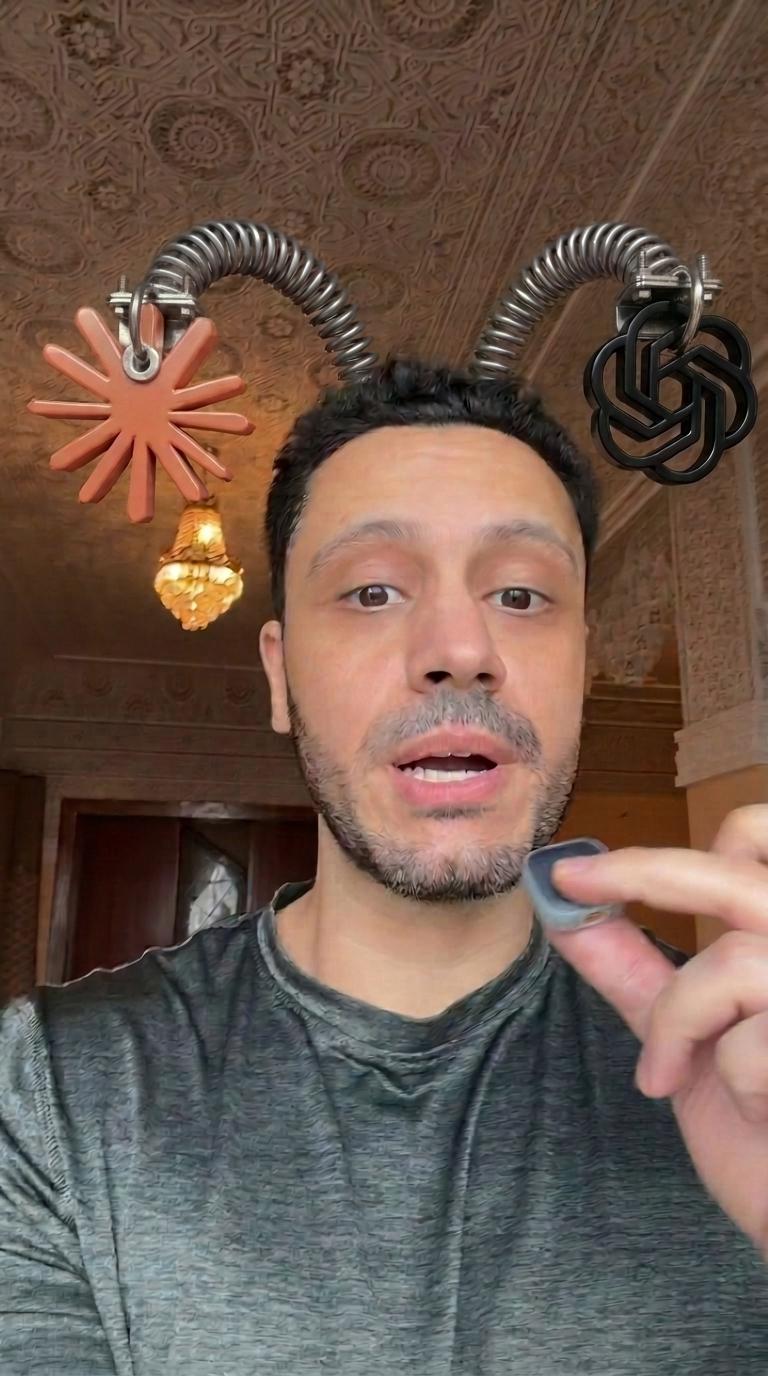
For the third one I wanted two AI logos bouncing on springs off my head. Here's the catch: you can't just describe a logo and expect it to come out right. The image model either refuses brand logos or draws a flat, wrong version.
So I grabbed the actual logo files and attached them as references.

Then the important bit: I asked for each logo as a full 3D object, not a flat graphic sitting in a white circle. Something like "make the logo itself a thick 3D sculpture, no disc behind it." Attaching the real file got the shape right, and asking for it as a 3D object got rid of the flat look.
Exact prompt
Keep this reference image exactly as it is — the same man and his face (no aging), pose, expression, green t-shirt, hand holding the grey DJI mic, headband, both thick floppy springs in their exact shapes and positions, both chunky 3D logos (coral Anthropic sunburst on the left, black OpenAI knot on the right), and the Moroccan riad background and warm light. Do not change anything except the one detail below. Change ONLY ONE thing: the connector on the RIGHT spring / OpenAI knot logo. On the LEFT spring, the metal hook goes THROUGH the Anthropic logo — the hook/ring threads through an opening in the logo, passing through it like a ring through an eyelet. Add the EXACT SAME detail to the RIGHT spring's black OpenAI knot: make its metal hook thread THROUGH the logo in the identical way, same shape, size and metal finish, so both logos have a matching hook passing through them. Keep the OpenAI logo itself, the spring, and everything else in the image exactly the same.
5. Animate it
Now I feed the clip back in as the base and the still as the look, and let it move. My motion, my timing and my lip sync stay exactly as I filmed them, and only the new thing moves.
Exact prompt
Combine the clips in order
The one thing you have to do is spell out the physics of whatever you added. On the siren I said flash it bright and alternate red and blue the whole time. On the springs I said the springs themselves flop and wobble and the logos just ride the tips. Leave that vague and you get a stiff, dead version.
Exact prompt
Create a new video that takes @video_1 — the man talking to camera in a handheld riad selfie — and transforms his head into the super-intelligent gorilla with the exposed-brain glass dome from @image_1, keeping his real motion, camera, timing and lip-sync. One continuous ~3-second talking shot. [SCENE 1] THE STARTING LOOK: the man's head is the hulking gorilla head from @image_1 — coarse dark brown-black fur, heavy protruding brow, broad flat nose, his own real human eyes and real mouth with stubble set naturally into the ape face, and the enlarged cranium capped by a thick clear glass dome revealing a big wet pinkish-grey brain. His raised hand is gorilla-furred, holding the small grey DJI mic exactly as in @video_1. The Moroccan riad, the warm light, the handheld camera and the exact timing of @video_1 are unchanged. He is talking: his real mouth inside the ape face moves in perfect lip-sync with @video_1 — lips, jaw and speech timing exactly as in @video_1, do not alter the mouth shapes. The whole ape head bobs and tilts naturally with his real head movement from @video_1, and the furred hand holds the mic steady as in @video_1. Throughout the shot, the exposed brain under the glass dome gently pulses and glistens, fine veins shifting, and the clear dome catches moving specular highlights with a soft cool inner glow. His intense eyes blink and track naturally, menacing and alive. Keep it photoreal and cinematic, like a real creature in the room — never a flat filter.
Exact prompt
Create a new video that takes @video_1 — the man talking to camera in a handheld riad selfie — and puts on him the novelty spring headband from @image_1 (two fat floppy coil springs on top of his head, the coral Anthropic sunburst hooked to the LEFT spring tip, the black OpenAI knot hooked to the RIGHT spring tip), keeping his real motion, camera, timing and lip-sync. One continuous ~4-second talking shot. [SCENE 1] THE STARTING LOOK: exactly as @image_1 — his real face and expression unchanged, no aging; the headband sits on the crown of his head with his forehead clear; two thick fat floppy coiled steel springs arc up from the top of his head, each with its chunky 3D logo hooked onto its tip (Anthropic coral sunburst on the left, OpenAI black knot on the right). His raised hand holds the small grey DJI mic as in @video_1; the Moroccan riad and warm light are unchanged. He is talking: his mouth moves in perfect lip-sync with @video_1 — lips, jaw and speech timing exactly as in @video_1, do not alter the mouth shapes. As his head moves and bobs with his speech, ALL the floppy motion happens in the SPRINGS THEMSELVES: the thick metal coils bend, flex, compress, wobble and sway, bouncing and jiggling like loose heavy springs, lagging behind his head movement then overshooting and wobbling back. The two logos stay FIRMLY FIXED and bolted to the ends of their springs — each logo simply rides wherever its own spring tip goes, keeping its upright orientation and roughly its place; the logos do NOT swing, spin, tilt wildly or travel around the frame on their own. The flop and wobble lives entirely in the spring coils; the logos just follow their spring tips. Keep his face locked and photoreal, like real springy props physically mounted on his head — never a flat filter.
6. Cut the hook on the sound, not the transcript
Quick warning, this one burned me twice. When you trim the clip to end on a word, don't trust a transcript's timestamps. They run early and chopped the end of my word both times. Open the actual audio waveform and cut in the little silent gap right after the word.
Why it works
The reason this lands is that it's still you. The camera, the timing, your voice and your mouth are all real, and the only impossible thing is the one object on your head. Your brain reads "real person talking" and "that's not possible" at the same time, and that little snag is what makes people stop scrolling.
One honest tip: use these as openers. One transformation up front, then cut to your normal footage. Each head swap is its own separate edit, so if you hard cut three of them together back to back they pop at the seams. One up front, then your normal footage, works way better.
Your turn: take one clip you already filmed and pick one line to sit a hook on. That's step one.
And if you'd rather not fiddle with references and physics prompts, Emero writes the prompts for you and keeps your look and your brand assets ready so you're not rebuilding them every chat, at cost.

Get one of these every day
I test new workflows daily and send them with the exact prompts, the models and the costs
6,526 generations tested so far
More workflows
See all
Kling 4.0: video-to-video AI that keeps your real motion
A video to video AI workflow that keeps your real footage and turns sayings into clips
GPT Image 2.6 Flare, Kling 4.0 · 8 min render

Kling 4.0 + GPT Image 2.6 Flare - fire, water, earth and air VFX from your own clips
Add fire, water, earth and air VFX to your own phone clips while keeping your real motion
GPT Image 2.6 Flare, Kling 4.0 · 8 min render

Kling 4.0 + GPT Image 2.6 Flare - turn yourself into four characters from your own clips
I turn four clips of myself into four characters, keeping my real motion with edit mode
GPT Image 2.6 Flare, Kling 4.0 · 8 min render